
Gravity Forms Dynamics 365
Purchase
Gravity Forms + Dynamics 365 WordPress + Dynamics 365 + Dataverse Integration

WordPress to
Dynamics 365 Integration

Automatically send Gravity Forms submissions to Microsoft Dynamics 365 and Dataverse as leads, contacts, opportunities, and any entity — no coding required.

No coding required
Works with all Dynamics editions
Microsoft Partner
U.S.-based support
Starting at $199/yr Save 46%
Gravity Forms Dynamics 365

OAuth 2.0 Secure

Enterprise-grade security

Frequently Asked Questions

What does the Gravity Forms Dynamics 365 Add-On do?

The Gravity Forms Dynamics 365 Add-On for WordPress connects Gravity Forms submissions directly to Microsoft Dynamics 365 or Dynamics CRM, creating or updating leads, contacts, and cases each time a form is submitted, without a separate integration service in between.
Does the Gravity Forms Dynamics 365 Add-On work with Dynamics 365 Online, or only on-premises?

The Gravity Forms Dynamics 365 Add-On supports both Microsoft Dynamics 365 Online and on-premises deployments; for on-premises installs it connects through an Internet-Facing Deployment (IFD) with claims-based authentication, or directly when the WordPress server can reach the Dynamics server.

Can I map Gravity Forms fields to Dynamics 365 fields without writing code?

Yes. The Gravity Forms Dynamics 365 Add-On maps form fields to Dynamics 365 fields through a point-and-click feed configuration screen in the WordPress admin, with no custom code required, including support for Dynamics Picklist and OptionSet fields, which don't map like plain text fields.

Does the Gravity Forms Dynamics 365 Add-On support older Dynamics CRM versions?

The Gravity Forms Dynamics 365 Add-On supports Microsoft Dynamics CRM 2011, 2013, 2015, and 2016 in addition to current Dynamics 365, so organizations that haven't yet migrated to Dynamics 365 can still connect Gravity Forms to their CRM.

What can the Gravity Forms Dynamics 365 Add-On create or update in Dynamics?

The Gravity Forms Dynamics 365 Add-On can create and update leads, contacts, and cases in Dynamics 365 or Dynamics CRM from a Gravity Forms submission, and checks for an existing record by email address first to avoid creating duplicates.

Is the Gravity Forms Dynamics 365 Add-On the same plugin as "WP Gravity Forms Dynamics CRM" on WordPress.org?

No. The Gravity Forms Dynamics 365 Add-On is a Saint Systems product sold at saintsystems.com; the free WordPress.org plugin "WP Gravity Forms Dynamics CRM" (gf-dynamics-crm) is a separate product built by CRM Perks, not by Saint Systems, and the two are not interchangeable despite the similar name.

Is there a free version of the Gravity Forms Dynamics 365 Add-On?

No. The Gravity Forms Dynamics 365 Add-On is sold as a paid plugin only, licensed in three tiers that differ by number of licensed sites and support level; there is no free tier or trial version.

What do I need to run the Gravity Forms Dynamics 365 Add-On?

The Gravity Forms Dynamics 365 Add-On requires WordPress 5.6 or later, Gravity Forms 1.9.10.16 or later at any Gravity Forms license level, PHP 7.0 or later, and a Microsoft Dynamics 365 or Dynamics CRM instance to connect to.

200+
Companies Worldwide
1M+
Form Entries Synced
50+
Dynamics Entities
23+
Countries Served

Powerful Features for Seamless Integration

Everything you need to connect your WordPress forms to Microsoft Dynamics 365.

Map to Any Entity

Create records in any standard or custom Dynamics 365 / Dataverse entity including leads, contacts, accounts, opportunities, and more. Supports all field types including lookups, option sets, and multi-select picklists. Simply select your target entity and map fields using a visual dropdown interface.

OAuth 2.0 Authentication

Enterprise-grade security with OAuth 2.0 and support for both Authorization Code flow and Client Credentials grant for server-to-server authentication. Client Credentials is ideal for production environments where no user interaction is needed.

Related Entity Support

Link records to existing entities like campaigns, marketing lists, accounts, and parent contacts. Automatically associate new leads with an existing marketing campaign or parent account using lookup field mapping.

Conditional Logic

Use Gravity Forms conditional logic to control when data is sent to Dynamics based on form field values. For example, only create a lead when a specific dropdown value is selected, or route submissions to different entities based on form input.

OptionSet & Picklist Fields

Full support for Dynamics picklist fields, option sets, boolean fields, and multi-select fields. Picklist values from your Dynamics instance are automatically fetched and available for mapping.

Resend Entries

Easily resend form entries to Dynamics from the WordPress admin, perfect for troubleshooting, recovering from API errors, or backfilling records after initial setup.

Get Started in Minutes

Simple setup process to connect your forms to Dynamics 365.

1

Install & Connect

Upload the plugin, enter your Dynamics 365 / Dataverse URL, and authenticate with OAuth.

2

Map Your Fields

Choose which Dynamics entity to create and map your form fields to entity attributes.

3

Start Collecting

Form submissions automatically create records in Dynamics 365 in real-time.

Connect in Seconds with OAuth 2.0

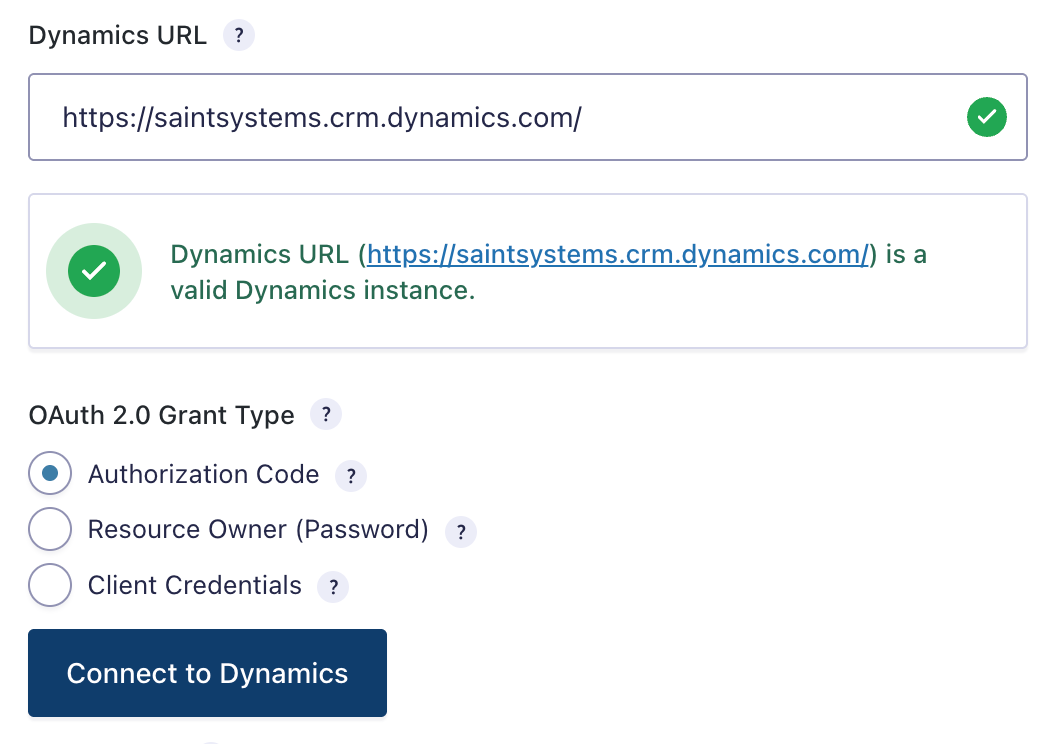
Enter your Dynamics 365 or Dataverse URL, choose your authentication method, and connect. Supports Authorization Code, Client Credentials, and Resource Owner grant types for maximum flexibility.

  • Automatic URL validation confirms your Dynamics instance
  • Client Credentials grant for server-to-server automation
  • Works with Dynamics 365 Online and On-Premises (IFD)
Dynamics 365 OAuth connection settings
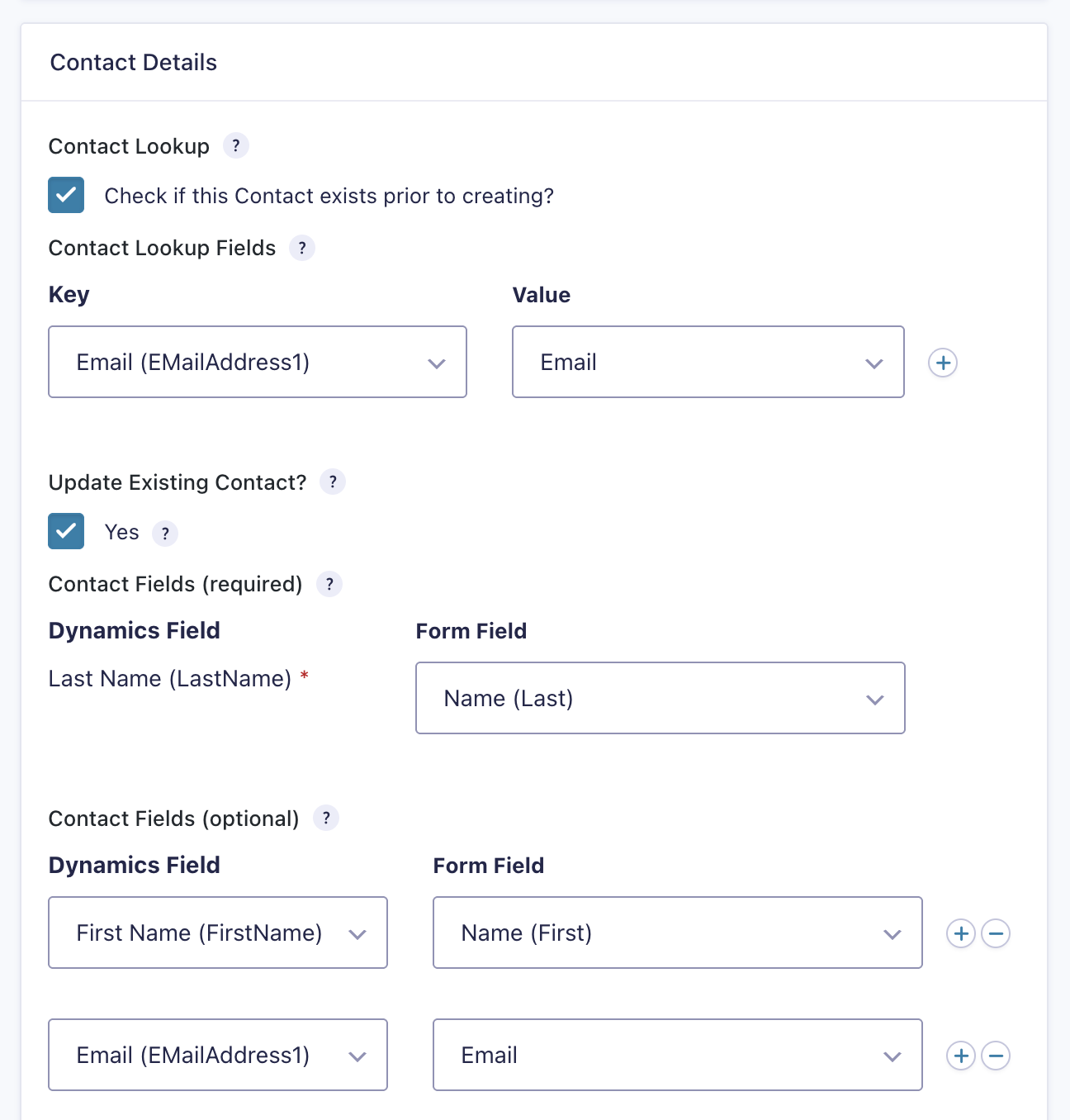
Visual field mapping interface

Visual Field Mapping — No Coding Required

Map your Gravity Forms fields to Dynamics 365 entity attributes using simple dropdown menus. See exactly which form field maps to which Dynamics field.

  • Duplicate detection — check for existing records before creating
  • Update existing records or create new ones automatically
  • Assign record owners and set lookup field values

Works with Any Dynamics Entity

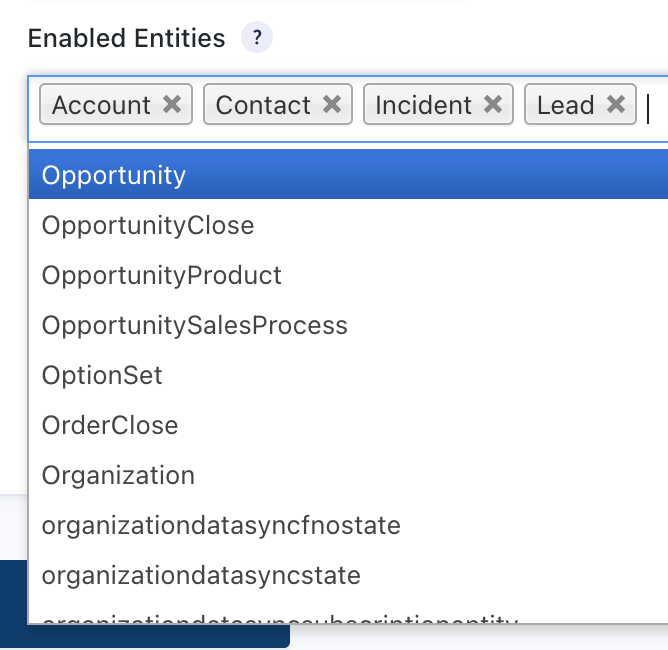
Create records in any standard or custom Dynamics 365 / Dataverse entity. Enable exactly the entities you need from the full list of available tables in your instance.

Leads
Contacts
Accounts
Opportunities
Cases
Tasks
Appointments
Campaigns
Marketing Lists
Custom Entities
Activities
Notes
Dynamics 365 entity selection

Ready to connect WordPress to Dynamics 365?

Join 200+ companies worldwide. 30-day money-back guarantee.

View Pricing

Why Choose Gravity Forms Dynamics 365?

Purpose-Built for Gravity Forms

Not a generic CRM connector. Every feature is designed specifically for the Gravity Forms + Dynamics 365 workflow.

Microsoft Partner

Built and supported by a Microsoft Silver Partner with deep Dynamics 365 / Dataverse expertise.

Battle-Tested Reliability

1M+ form entries synced across 23+ countries. Trusted in production environments by companies worldwide.

U.S.-Based Expert Support

Direct access to our U.S.-based development & support team. We understand both WordPress and Dynamics 365 inside and out.

Simple, Transparent Pricing

Choose the plan that fits your needs. All plans include updates and support.

Join 200+ companies worldwide. Save up to 46% with annual billing.

Personal

1 site license

$29 /month
$199 /year

Save $149/year

  • 1 site license
  • All Dynamics 365 entities
  • Updates & priority support
  • 30-day money-back guarantee
Most Popular

Business

5 site licenses

$49 /month
$299 /year

Save $289/year

  • 5 site licenses
  • All Dynamics 365 entities
  • Updates & priority support
  • 30-day money-back guarantee

Enterprise

25 site licenses

$79 /month
$499 /year

Save $449/year

  • 25 site licenses
  • All Dynamics 365 entities
  • Updates & priority support
  • 30-day money-back guarantee

Trusted by Customers Worldwide

See what our customers have to say about their experience.

"A powerful plugin to integrate WordPress with Microsoft Dynamics CRM. This plugin allowed us to easily setup a webform on our WordPress website to capture leads in Dynamics 365. Simple and easy-to-use!"

B

Brian Teague

Co-founder, Pocketstop

"We've been using this plugin since beta and it has been invaluable. Our sales team instantaneously receives information about potential customers interacting with our site. The plugin is easy to setup and use — adding feeds to sync with the CRM is seamless. The support staff at Saint Systems has been great and very responsive."

D

David Kern

Verified Customer

"Excellent support. The team at Saint Systems quickly resolved our issues in one support chat. They also directed me to the relevant documentation pages. Support is 5-star!"

K

Kev Xaveus

Verified Customer

Ready to Connect WordPress to Dynamics 365?

Join hundreds of companies already using Gravity Forms Dynamics 365 to streamline their lead capture and CRM workflow.

30-day money-back guarantee. No questions asked.